How to Find Target Audience for Meta Ads (and Stop Wasting Your Budget)
Introduction: The Crucial Role of Targeting
Let’s be honest: anyone can launch an ad campaign on Facebook or Instagram, but throwing money at a vague audience is a recipe for disaster. The moment you start spending money on Meta, your number one priority shifts: it’s not about the captivating image or the snappy headline—it’s about the who. That’s why the key to driving a strong Return on Ad Spend (ROAS) lies in mastering how to find target audience for Meta ads. This guide isn’t about setting up basic demographics; it’s about mastering the core art of Facebook ad targeting and connecting your perfect product with the people most likely to buy it. When you learn to find target audience for Meta ads effectively, you improve ad spend efficiency and the rest of your ad strategy falls into place.
Audience Foundation: The Prerequisite Layer
Before you even touch Ads Manager, you need to lay a rock-solid foundation, and that starts with how to define target market for Facebook campaigns. The first step to successfully segmenting your audience is defining your Buyer Persona or customer avatar. This isn’t just an age range; it’s a semi-fictional, detailed portrait of your ideal customer, including their pain points, motivations, goals, and even where they hang out online. By clearly defining this person—let’s call her “Marketing Mary” or “Tech Tom”—you can translate their characteristics directly into Detailed Targeting options within Meta. This buyer persona development is essential when you find target audience for Meta ads that convert.
The Three Pillars of Core Audiences:
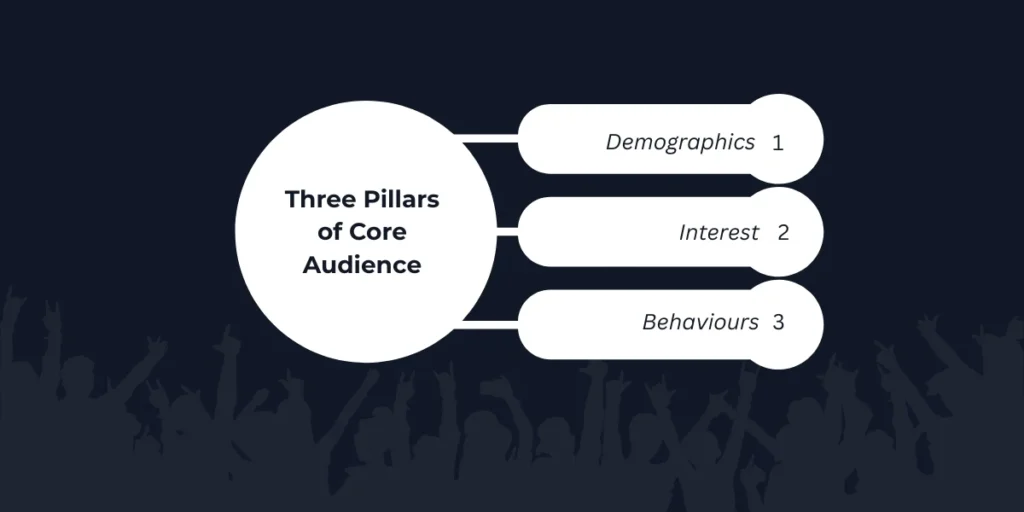
1.Demographics (The Essential Foundation)
- The Basics: This is where you filter by age, gender, education, and location.
- The Pro Strategy: Look for transitional life phases. For example, if you sell home goods, you might want to specifically target users whose life event status is “Recently Moved.”
- The Result: Leveraging these demographic fundamentals allows you to quickly find target audience for Meta ads who are highly receptive to relevant, timely offers.
2. Interests (Connecting Passions to Products)
- The Basics: This is where you connect your product to your customer avatar’s hobbies and passions.
- The Trap: If you sell specialized running shoes, selecting a generic category like “Running” is a classic example of a targeting too broad approach that wastes budget.
- The Fix: Layer your campaigns with much more granular interest targeting, such as “Ultra Marathons,” “Garmin,” or “Triathlon.”
- The Result: By using these interests as proxies for a specific lifestyle and purchasing power, your audience targeting strategy shifts from generic to hyper-specific. This precise Meta Ads targeting helps you find target audience for Meta ads with genuine purchase intent.
3. Behaviors (Capturing High-Intent Signals)
- The Basics: These options target the actual actions users take both on and off the Meta platforms. This is where your highest-intent signals live.
- The Signals: Examples include “Device Users,” specific “Digital Activities,” or the highly coveted “Engaged Shoppers” (people who have actively clicked a “Shop Now” button in the last week).
- The Fix: Combine your interest targeting and behaviors by utilizing the “Narrow Audience” function.
- The Result: You ensure you are reaching people who not only like the topic but who are also active buyers within that space. This layered audience targeting strategy is critical for effective prospecting and helps you find target audience for Meta ads who are ready to purchase today.
| Targeting Layer | The Amateur Mistake | The Refined Pro Strategy |
| Demographics | Targeting everyone in a 50-mile radius. | Targeting the highly specific “Recently Moved” life event. |
| Interests | Using a generic term like “Running.” | Targeting premium brand proxies like “Garmin.” |
| Behaviors | Relying entirely on what people “Like.” | Narrowing the audience strictly to “Engaged Shoppers.” |
Core Strategies to Find Target Audience for Meta Ads
A Deep Dive into Meta Ads targeting options using first-party data:
This section is a deep dive into using your first-party data—the gold standard of targeting—to go beyond basic interest targeting layering. The first pillar is the Custom Audience. These audiences are derived from users who have already interacted with your business, making them essential for high-intent retargeting. Sources include: your website traffic (via the Meta Pixel and Conversions API), uploaded customer lists (from your CRM), and users who have engaged with your content (like video views or page followers). When you find target audience for Meta ads using Custom Audiences, targeting cart abandoners or recent email sign-ups with specific offers is often the quickest path to a high ROAS and improved ROI.
The second pillar, the Lookalike Audience, is how you achieve meaningful scale and effective prospecting. By using your highest-value Custom Audiences (e.g., your top 5% of purchasers) as a ‘seed,’ you instruct the Meta algorithm to find target audience for Meta ads who share the demographic, interest, and behavioral patterns of your best customers. Lookalike Audiences are defined by a percentage (1-10%), where 1% is the closest match (highest quality, smallest reach) and 10% is the broadest match (lower quality, most enormous reach). Testing different percentages is crucial for balancing relevance and scale when you find target audience for Meta ads. This Facebook ad targeting technique dramatically improves ad spend efficiency compared to cold prospecting alone.
Understanding Modern Meta Ads Targeting Options:
Meta has evolved its targeting capabilities to include Advantage+ Audience, which combines manual detailed targeting with algorithmic optimization. While Advantage+ Audience can work well for advertisers with established Meta Pixel data and active Conversions API integration, mastering manual audience targeting strategy is still essential for those learning to find target audience for Meta ads effectively. The key is understanding when to leverage automation versus when granular Facebook ad targeting control delivers better ROI.
Advanced Tactics: Combining Audiences for Precision
This section is the masterclass in audience organization. To get the best results, run separate ad sets for each stage of your customer’s journey—Awareness, Consideration, and Conversion—and make sure these audiences don’t overlap. This is where you structure a true Meta Ads targeting funnel using advanced layering and exclusion audiences.
A. The Funnel Structure: Cold, Warm, and Hot
Your campaigns should be segmented into three core ad sets based on how familiar the user is with your brand. This tiered audience targeting strategy is how sophisticated advertisers find target audience for Meta ads at scale:
| Funnel Stage | Audience Type | Goal | Ad Messaging/Creative |
| Cold (Top of Funnel – ToFu) | 1-3% High-Value Lookalike Audiences; Layered Core Audiences (Interest Targeting + Behavior) | Prospecting & Awareness (Video Views, Traffic, Engagement) | Problem-solving content; educational videos; compelling offers. |
| Warm (Middle of Funnel – MoFu) | Custom Audiences of Engagers (30-90 days video viewers, Instagram/Facebook engagers) | Consideration & Nurturing (Traffic, Leads, Add to Cart) | Product benefits; social proof (reviews/testimonials); comparison guides. |
| Hot (Bottom of Funnel – BoFu) | High-Intent Custom Audiences (7-day website visitors, Add to Carts, Customer List Retargeting) | Conversion (Purchases, Lead Submissions) | Urgency-driven deals; free shipping offers; abandoned cart reminders. |
B. Precision Prospecting: Layering and Narrowing
For your Cold Audiences, use the “Narrow Audience” function within Detailed Targeting to combine interests and behaviors, creating ultra-niche segments that signal purchase intent. This prevents your targeting too broad problem and helps you find target audience for Meta ads with laser precision.
Example: Instead of targeting Interest: Fitness, narrow it to people who must also match Behavior: Engaged Shoppers and Interest: Protein Powder. This Meta Ads targeting layering technique ensures maximum ad spend efficiency.
Pro Tip: For maximum scale with Lookalike Audiences, test different seeds (e.g., 1% LAL of all customers vs. 3% LAL of top 10% customers). Each seed variation helps you find target audience for Meta ads with different characteristics, allowing you to optimize for ROI.
C. The Secret to a Clean Funnel: Mastering Exclusion Audiences
The most critical step in creating a clean, high-performing funnel isn’t just about who you include—it is about who you leave out. Using Exclusion audiences ensures you don’t waste your budget showing prospecting ads to people who are already hot leads, or retargeting ads to people who have already purchased.Properly setting these up is fundamental when you want to find target audience for Meta ads efficiently. Here are the three non-negotiable exclusions you need to build:
The Result: This tool allows you to adjust your exclusion audiences so both ad sets don’t accidentally bid against each other for the same person. It ensures your audience targeting strategy remains highly efficient and cost-effective.
1. Exclude Current Buyers (The Mandatory Step)
The Setup: From all of your prospecting (Cold) and retargeting (Warm) campaigns, you must exclude a Custom Audience of Past Purchasers.
How to Do It: Use an uploaded Customer List, or exclude website visitors who hit your “Thank You” page tracked by your Meta Pixel in the last 180 days.
The Result: This Facebook ad targeting exclusion immediately improves your ad spend efficiency, preventing you from annoying current customers with ads for products they already own.
2. Exclude Higher-Intent Groups (Protecting Cold Campaigns)
The Setup: In your Cold (Prospecting) campaigns, use exclusion audiences to completely remove your Warm and Hot Custom Audiences.
How to Do It: Exclude all 30-day website visitors tracked via your Meta Pixel and the Conversions API.
The Result: This forces your budget out into the wild to find target audience for Meta ads who are genuinely new prospects, rather than quietly wasting money re-engaging people who already know your brand.
3. Cross-Campaign Exclusions (Preventing Overlap)
The Setup: What happens if you run two separate cold ad sets side-by-side? (For example, one Interest Targeting-based set and one Lookalike Audience-based set).
How to Do It: Use the Audience Overlap Tool found within Meta’s Audience Insights.
Continuous Optimization and Testing
Your audience targeting strategy is a living thing. Meta’s algorithms are constantly evolving, competition is changing, and audience groups are experiencing ad fatigue. The final, mandatory step to maintain a high ROAS is to establish a rigorous testing and optimization cycle that continually improves how you find target audience for Meta ads and adjusts your Meta Ads targeting based on real-time campaign data.
A. The Audience A/B Testing Framework
Successful audience testing follows one rule: test one variable at a time. Never change the creative and the audience in the same test. The goal is to prove which segment delivers the lowest Cost Per Acquisition (CPA) or highest ROI and ad spend efficiency.
Lookalike vs. Lookalike: Test a 1% Lookalike Audience (LAL) of your top purchasers against a 5% LAL of your general customer list. This helps you find target audience for Meta ads that balance quality and reach.
Layering vs. Broad: Test a highly detailed, narrow Core Audience (e.g., “Engaged Shoppers” + “Interest Targeting: X”) against a broader, less-layered interest segment. If your results show low performance, you’ll know if your targeting too broad or too narrow.
Advantage+ vs. Manual: Test Advantage+ Audience against your best-performing manual detailed targeting setup to see which delivers better ROI for your specific customer avatar.
Actionable Tip: Before launching a new prospecting audience, use Meta’s Audience Overlap Tool to ensure the new segment doesn’t significantly overlap (more than 20-30%) with existing, proven audiences. This prevents you from having targeting too broad across multiple ad sets.
B. Performance Analysis and Breakdown
Once a test runs for 7–14 days and has achieved statistical significance (enough conversions to make a decision), dive into the reporting metrics to understand who is actually buying. This analysis refines how you find target audience for Meta ads moving forward.
Delivery Breakdown: Use the Breakdown feature in Ads Manager to segment results by Age, Gender, Platform, and Placement. This reveals your “Golden Segment”—the specific group (e.g., “Women aged 35–44 on Instagram Stories”) that converts most efficiently. This insight should directly inform your buyer persona and customer avatar definitions.
Refinement: Use the insights from your Golden Segment to inform your next round of Facebook ad targeting. For instance, if Men over 55 have a 5x higher CPA, you might exclude them in future ad sets using exclusion audiences, or create a hyper-specific, low-budget ad set dedicated just to them. This is how you find target audience for Meta ads that maximize ad spend efficiency.
C. Addressing Audience Fatigue (Frequency)
Ad Frequency tells you how many times, on average, each person in your audience has seen your ad. As frequency rises, the efficiency of your Meta Ads targeting almost always declines, leading to wasted spend and lower Click-Through Rates (CTR).
Monitoring: If your frequency climbs above 3.0–5.0 in Cold (prospecting) audiences, it’s a strong signal for audience fatigue—essentially, your targeting too broad for the current creative, or you’ve exhausted the segment.
Action: When fatigue hits, you have two options: 1) Swap out the Creative by testing new advertising creative strategies (the easiest fix, as the ad is the problem, not the audience targeting strategy), or 2) Retire the Audience and find target audience for Meta ads using a new, fresh Lookalike Audience or Interest Targeting-based audience that is larger or more segmented.
Conclusion: Your Path to Meta Ads Success Starts Here
Learning how to find target audience for Meta ads is the difference between burning through your budget and building a profitable, scalable advertising engine. From crafting detailed buyer personas to leveraging Custom Audiences and Lookalike targeting, you now have the complete framework to stop guessing and start converting.
But here’s the reality: mastering Meta Ads targeting takes time, constant testing, and deep platform expertise. While you’re focused on running your business, are you confident you’re squeezing every dollar of ROI from your ad spend?
we don’t just run ads—we architect high-performing Meta Ads campaigns built on data-driven audience strategies.
Frequently Asked Questions (FAQ)
1. What is the difference between Custom Audience and Lookalike Audience?
A Custom Audience uses your own data (customer lists, website visitors, video viewers) to retarget people who already interacted with your business. A Lookalike Audience helps you reach new users who have similar behaviors and interests to your existing customers.
2. Why is my Meta Ads audience too broad?
Your audience may be too broad if you only target general interests. To narrow it, combine interests with demographics or behaviors and exclude irrelevant groups to improve targeting accuracy.
3. What is the ideal seed size for a Lookalike Audience?
The recommended seed size is 1,000–5,000 high-quality users. A smaller group of high-value customers often performs better than a large group of low-engagement users.
4. How do Meta Pixel and Conversions API help with targeting?
They track user actions on your website and send data to Meta. This helps create better Custom Audiences, improve Lookalike Audiences, and optimize ad performance..
5. Should I use Advantage+ Audience or manual targeting?
If you have strong conversion data and tracking, Advantage+ Audience can work well. If you’re new or have limited data, manual targeting gives more control and can deliver better results initially.
