
Win the Google Ads Auction: Bidding, CPC & Ad Rank
Introduction: What is the Google Ads Auction?
Have you ever wondered what exactly happens the moment you type a search query into Google? Behind the scenes, a lightning-fast process called the Google Ads auction takes place. If you want to master how Google Ads works, you absolutely have to understand this system first.
So, what is it? The Google Ads auction is a complex real-time bidding (RTB) system that happens in mere milliseconds every single time someone searches for something online. It has one major job: to decide if your ad is actually going to show up. But the process does not stop there. The Google Ads auction also determines your exact position on the search results page and exactly how much you will pay for a click.
Here is the biggest myth out there: the advertiser with the deepest pockets automatically wins. That is entirely false. In the Google Ads auction, having the biggest budget does not guarantee the top spot. Google cares far more about ad relevance and a great user experience than just your money.
Step-by-Step: The Google Ads Auction Process Explained
Let’s break down exactly what happens during the Google Ads auction. It all happens in the blink of an eye, but there is a very logical, four-step flow to the entire process.
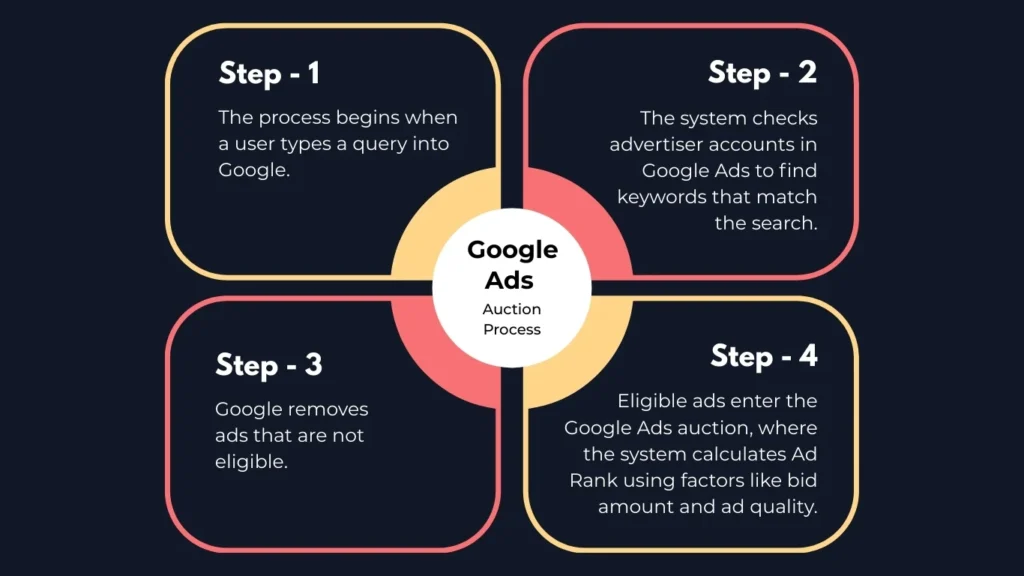
Step 1: The Search Query Everything starts the moment a potential customer types a phrase into Google. What really matters here is their search intent. Are they looking to buy something right now, or are they simply doing some light research?
Step 2: Keyword Matching Instantly, the Google Ads auction scans millions of advertiser accounts to find a connection. It looks at your chosen keyword match types—whether you set them up as broad, phrase, or exact match—to see if your campaign is a good fit for what the person just typed into the search bar.
Step 3: The Filtering Stage This is where Google cleans house. If your daily budget is already spent, or if your ad violates a policy, you are dropped. More importantly, if the user’s search triggers one of your negative keywords, you are immediately pulled out of the running. This filtering process protects your budget from useless clicks and keeps the Google Ads auction highly relevant for the searcher.
Step 4: The Auction & Ad Positioning Finally, we reach the actual showdown. The remaining, eligible ads officially enter the Google Ads auction. Here, the algorithm crunches the numbers to figure out your ad positioning. It decides who gets the highly coveted top spot, who falls to the bottom of the page, and who does not get to show up at all.
3 Core Components of the Google Ads Auction
Now that you know the steps, what actually decides the winner of a Google Ads auction? It all boils down to three core pillars. If you want to rank at the top of the page, you need to understand how these pieces work together. First up is your Maximum CPC bid. Simply put, this is the absolute most money you are willing to pay for a single click during the Google Ads auction. It acts as your financial ceiling. However, as we mentioned earlier, throwing money at the screen will not automatically secure the top spot.
Second, and arguably the most important factor, is your Google Ads Quality Score. Google assigns your ad a score from one to ten based on how well it actually matches the searcher’s needs. The search engine heavily favors a great user experience (UX). If your ad and landing page are highly relevant and helpful, Google rewards you with a higher score.
Third is the expected impact of your ad assets (which you might remember by their old name, ad extensions). When you add extra information like phone numbers, location details, or specific page links to your ad, Google predicts how those additions will improve the searcher’s experience. Better assets give you a serious competitive edge in every Google Ads auction.
Deep Dive: How to Improve Quality Score in Google Ads
Let’s talk about the ultimate secret weapon you need to win the Google Ads auction. If you want to beat out massive competitors who have endless advertising budgets, you have to master your Google Ads Quality Score. Google uses this simple one-to-ten metric to measure the overall quality and usefulness of your campaigns. Why does this matter so much to your bottom line? Because a high score literally discounts the amount of money you pay for every single click. If you are wondering exactly how to improve Quality Score in Google Ads, you need to focus heavily on its three main ingredients.
The first piece of the puzzle is your Expected Click-Through Rate (eCTR). Google’s algorithm looks at your historical performance data to predict how likely someone is to actually click your ad when it appears in the Google Ads auction. If your past ads have a strong track record of getting attention and clicks, Google trusts you more and boosts your score.
The second ingredient is ad relevance. Does your headline actually match what the person typed into the search bar? If a potential customer searches for “emergency plumber,” and your ad just talks about general home repairs, your relevance drops significantly. Being highly specific and matching the user’s exact phrasing ensures you stay competitive in the Google Ads auction.
Finally, we have to look at your landing page experience. Your ad copy could be absolutely perfect, but if the user clicks it and lands on a slow, confusing, or broken website, Google will actively penalize you. A great landing page that loads fast on mobile devices and delivers exactly what the ad promised is crucial for success. By focusing on giving the searcher exactly what they are looking for at every step, you naturally boost your score. This simple strategy helps you dominate the Google Ads auction without constantly having to raise your daily budget.
How Does Google Calculate Ad Rank in the Google Ads Auction?
So, with all these different factors in play, exactly how does Google calculate Ad Rank? Think of Ad Rank as your final, official score in the Google Ads auction. This single number is incredibly important because your Ad Rank Google Ads performance is what actually dictates where your ad sits on the search results page or if it even shows up at all.
The formula itself is pretty straightforward, but it relies heavily on advanced machine learning happening behind the scenes to process the data instantly. Basically, your Ad Rank equals your maximum bid multiplied by your Quality Score, plus the expected positive impact of your ad assets. Because the Google Ads auction uses this math, a massive budget does not automatically guarantee a win.
Let’s look at a quick example to see how this plays out in a real Google Ads auction. Imagine you bid just $2, but your ad is highly relevant and has a perfect Quality Score of 10. Your final score is 20. Now, imagine a competitor bids $5, but their landing page is terrible, giving them a low Quality Score of 2. Their score is only 10. Even though they bid more than double what you did, you easily win that Google Ads auction and take the top spot.
The Google Ads Second Price Auction Explained
Let’s talk about what happens to your budget. One of the best parts about the Google Ads auction is that you almost never actually pay your maximum bid. If you want the Google Ads second price auction explained simply, think of it like this: in a standard auction, if you bid ten dollars and the next person bids five, you pay ten dollars. But here, the system is designed to save you money while keeping the bidding fair. So, how does the math actually work? In the Google Ads auction, you only have to pay exactly enough to beat the Ad Rank of the competitor directly below you on the page, plus one single cent. That final amount becomes your actual Cost Per Click (CPC).
This pricing model is exactly why having a fantastic ad is basically a cheat code for the Google Ads auction. Because your final price is calculated using your own Quality Score, raising your score literally forces your Cost Per Click (CPC) to drop. Ultimately, the better your ad performs for the person searching, the less money you have to pay Google to win every single Google Ads auction.
5 Bidding Strategies to Win the Google Ads Auction
Let’s talk about the best ways to actually come out on top without draining your wallet. Over the years, Google Ads bidding has evolved dramatically. It used to be all about logging in and adjusting your bids by hand every single day. Now, when looking at the debate of Smart bidding vs manual CPC, it is almost always best to let the machines do the heavy lifting. Google’s Artificial Intelligence (AI) can instantly analyze millions of hidden user signals like their specific device, current location, and even the time of day to adjust your bids in real-time during every single Google Ads auction.
One of the absolute best automated strategies you can use right now is Target CPA (Cost Per Action). Instead of focusing just on getting clicks, you tell Google exactly how much money you are willing to pay for a new lead or a sale. The algorithm then automatically adjusts your bids in the Google Ads auction to try and get you as many conversions as possible at or below that specific price point. Another incredibly powerful option is Maximize Conversions. If you have a strict daily budget but want the absolute highest volume of leads possible, this strategy is perfect. It tells the system to aggressively spend your daily budget to get the most results. It works beautifully once your account has built up some solid historical data.
Finally, remember that winning isn’t just about the technical settings you choose. It is also about how you organize your account. To dominate the Google Ads auction, you need to group your keywords very tightly. Never cram fifty random phrases into one ad group. Instead, stick to fifteen or twenty highly related terms. This ensures your ad copy perfectly matches the user’s exact search, keeping your relevance high and your costs incredibly low. Combining these automated bidding tactics with a well-organized account is the most reliable way to beat your competitors.
Analyzing Results with the Google Ads Auction Insights Report
Once your campaigns are live, your work is not quite finished. You need to know exactly who is trying to outbid you in every single Google Ads auction. This is where the Google Ads auction insights report becomes an incredibly valuable tool for your business. Think of this report as a clear window into your competitors’ strategies. It reveals exactly which other companies are bidding on the same search terms as you. You can easily see how often their ads appear higher on the page and how aggressively they are targeting your potential customers.
By analyzing your own historical performance right alongside this competitive data, you can pinpoint exactly where you might be losing visibility. If a rival business suddenly starts outranking you in the Google Ads auction, you can use these exact metrics to pivot your strategy, adjust your daily budget, or rewrite your ad copy—or partner with professional [Google Ads services] to handle the heavy lifting for you. Making this a regular habit is a fantastic way to maintain your edge and continue dominating the Google Ads auction over time.
FAQs
1. Why is my CPC high in Google Ads?
High Cost Per Click (CPC) usually happens when your Quality Score is low. Improving ad relevance, writing better ad copy, and optimizing the landing page can help lower CPC.
2. Does the highest bidder always win the auction?
No. Google ranks ads using Ad Rank, which depends on both the bid amount and Quality Score. A highly relevant ad can outrank a higher bid.
3. Does pausing campaigns affect performance?
Yes. Frequently pausing campaigns can reduce historical data used by Google’s algorithm, which may negatively affect future ad performance.
4. How does Smart Bidding impact the auction?
Smart Bidding uses AI to adjust bids automatically for each auction based on signals like device, location, and user behavior, helping improve conversions and ROI.
