
Google Ads Search Terms vs Keywords: What’s the Difference?
Introduction
If you manage Google Ads campaigns, you’ve probably come across two terms that sound almost identical: keywordsand search terms.
They are related, but they are not the same thing.
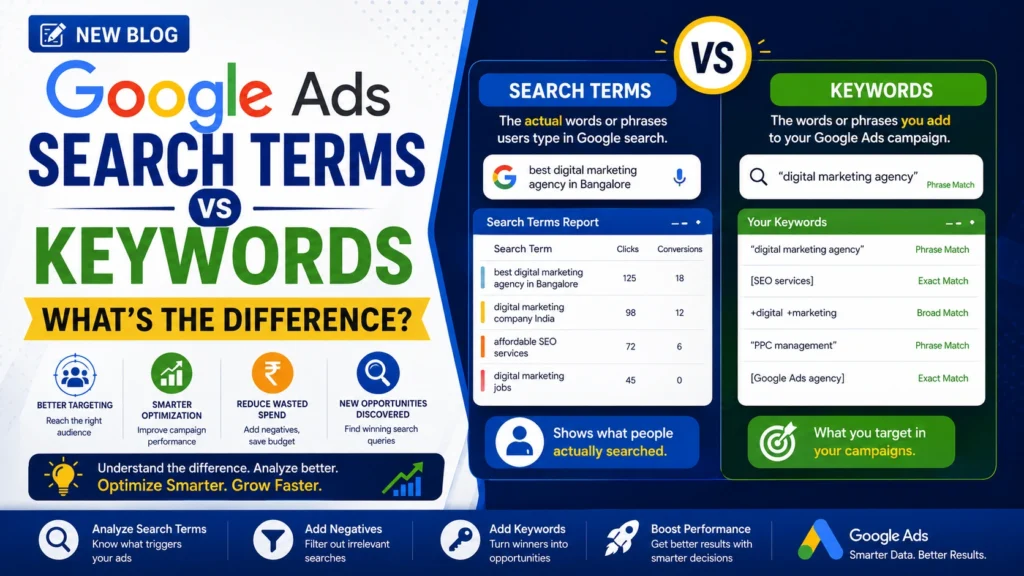
A keyword is something an advertiser adds to a Google Ads campaign to help determine which searches can trigger an ad. A search term is what a person actually types or submits when searching on Google or a Google Search partner site.
For example, suppose a digital marketing agency adds the keyword:
digital marketing agency
A potential customer might search:
best digital marketing agency for real estate
The keyword and search term are different, but Google’s keyword-matching system may connect them based on the selected match type and other signals.
Understanding this difference is important because search terms show you what potential customers are actually searching for, while keywords represent the targeting strategy you’ve chosen.
Google’s Search Terms Report lets advertisers review searches that triggered their ads and use that information to refine keywords, identify negative keywords, and discover new opportunities.
What Is a Google Ads Keyword?
A keyword is a word or phrase that an advertiser adds to a Google Ads campaign to help match ads with relevant searches.
For example, a business selling SEO services might use keywords such as:
- SEO services
- SEO agency
- local SEO services
- technical SEO agency
- SEO company for small business
Keywords help Google understand which searches may be relevant to the advertiser’s offering.
The way a keyword can match a user’s search depends on its match type. Google Ads currently provides broad match, phrase match, and exact match options for positive keywords.
What Is a Search Term in Google Ads?
A search term is the actual word or phrase a user enters when searching on Google or a Google Search partner site.
For example:
User searches:
“affordable SEO agency in Bangalore”
If your keyword is:
SEO agency
that search may trigger your ad depending on your keyword match settings and other Google Ads signals.
The Search Terms Report helps you understand the searches that resulted in your ads being shown and how those searches performed.
Search Terms vs Keywords: The Key Difference
The easiest way to remember the difference is:
Keywords are what advertisers target. Search terms are what users search.
| Keywords | Search Terms |
|---|---|
| Added by advertisers | Entered by users |
| Part of your campaign strategy | Reflect actual user searches |
| Used for ad matching | Show what triggered the ad |
| Can use match types | Can vary from the keyword |
| Used to control targeting | Used to analyze actual demand |
| Can be optimized before launch | Provide real campaign data |
This distinction makes the Search Terms Report one of the most useful resources for ongoing Google Ads optimization.
How Do Keywords and Search Terms Work Together?
The process can be simplified into four steps:
Step 1: You Add a Keyword
For example:
Keyword:real estate marketing agency
Step 2: A User Searches
Search term:best digital marketing agency for real estate companies
Step 3: Google Evaluates the Match
Google’s keyword matching system determines whether the search is sufficiently related to the keyword based on the selected match type and other available signals.
Step 4: Your Ad May Enter the Auction
If the keyword and search are eligible to match, the ad can proceed into the auction, where other factors determine whether and where it appears.
This is why your Search Terms Report can contain searches that aren’t identical to the keywords you entered.
Understanding Google Ads Keyword Match Types
Match types influence how closely a user’s search needs to relate to your keyword before your ad can be considered.
1. Broad Match
Broad match provides the widest reach among the three positive keyword match types.
For example:
Keyword:real estate marketing
Your ad may be eligible for searches related to the meaning or intent of that keyword, not only searches containing the exact words.
Google states that broad match can use additional signals, including landing pages, keywords in the ad group, and previous searches, to help identify relevant searches.
Best Used For
- Discovering new demand
- Reaching broader audiences
- Campaigns using Smart Bidding
- Finding new relevant search terms
2. Phrase Match
Phrase match provides more control than broad match while allowing your ads to reach searches related to the meaning of the keyword.
For example:
“real estate marketing”
may match searches with a more specific version of that intent.
Phrase match can provide a balance between reach and control.
3. Exact Match
Exact match provides the most steering over which searches your keyword can match among the three positive match types.
However, “exact” does not necessarily mean the user must type every word exactly as written.
Google describes exact match as matching searches that have the same meaning or intent as the keyword.
Example:
[real estate marketing agency]
The ad may be eligible for searches that convey the same intent even when the wording differs.
Why Search Terms Matter More Than Many Advertisers Realise
Keywords tell you what you planned to target.
Search terms can tell you what people actually searched for.
That difference provides valuable campaign insights.
For example, imagine you are running ads for an e-commerce marketing agency.
Your keyword:
ecommerce marketing agency
Your Search Terms Report might reveal searches such as:
- ecommerce marketing agency
- ecommerce advertising agency
- digital marketing for online stores
- ecommerce SEO agency
- Shopify marketing agency
Some of these may be valuable opportunities.
Others may be irrelevant.
That’s where optimization begins.
How to Use the Search Terms Report
Google Ads provides a Search Terms Report that allows advertisers to review search queries that triggered their ads and analyze their performance.
You can access it through:
Google Ads → Campaigns → Insights & reports → Search terms
The exact interface can change as Google updates Ads Manager, but the Search Terms Report remains a key source for search-query analysis.
1. Find High-Performing Search Terms
Look for searches that generate valuable actions.
For example:
| Search Term | Clicks | Conversions | Action |
|---|---|---|---|
| SEO agency Bangalore | 25 | 5 | Monitor / consider keyword |
| affordable SEO services | 18 | 3 | Test as keyword |
| free SEO course | 12 | 0 | Consider negative |
| SEO jobs | 9 | 0 | Consider negative |
Search terms that consistently generate relevant conversions can provide ideas for your keyword strategy.
Google specifically recommends using successful search terms to identify potential new keywords.
2. Identify Irrelevant Search Terms
Not every search that triggers your ad will be valuable.
Suppose you’re selling paid digital marketing services, but your ads appear for:
- digital marketing jobs
- digital marketing course
- digital marketing salary
- free digital marketing training
These searches may generate clicks without generating qualified business leads.
Adding appropriate negative keywords can help prevent ads from showing for irrelevant searches.
Google recommends using search-term data to identify negative keyword opportunities.
3. Discover New Keyword Opportunities
Search terms can reveal language your customers actually use.
For example, you may initially target:
Google Ads agency
but discover that users frequently search:
PPC management company
If that search is relevant and performs well, it could provide an opportunity to expand your keyword strategy.
This is one reason search-term analysis should be part of ongoing campaign optimization.
4. Review the Keyword Column
The Search Terms Report also contains a Keyword column that can show which keyword in your account matched a particular search term and triggered your ad.
This helps you understand your keywords “in action” rather than looking at them only as a static list.
You can also review the Match type column to understand how closely the search term was related to the keyword that triggered the ad.
Search Term → Keyword → Negative Keyword
A useful optimization workflow is:
Search Term Data
↓
Analyze Relevance & Performance
↓
Keep Valuable Searches
↓
Add New Keywords Where Appropriate
↓
Exclude Irrelevant Searches
↓
Optimize Campaign Performance
This creates a continuous feedback loop between your campaign strategy and real customer search behavior.
When Should You Add a Search Term as a Keyword?
Don’t automatically add every successful search term as a keyword.
First evaluate:
Relevance
Does the search clearly relate to your product or service?
Performance
Has it generated meaningful clicks, conversions, or other valuable results?
Search Intent
Does the user appear to have commercial intent?
Existing Coverage
Is the search already adequately covered by an existing keyword?
Scalability
Is there enough search demand to justify adding it separately?
Adding keywords without a clear strategy can create unnecessary complexity.
When Should You Add a Search Term as a Negative Keyword?
Consider a negative keyword when a search is clearly irrelevant to your business.
For example, if you provide paid SEO services and repeatedly receive searches for:
- SEO jobs
- SEO courses
- free SEO tools
- SEO certification
you may want to exclude those searches.
Negative keywords can help reduce wasted spend and improve traffic quality. Google notes that negative keyword matching behaves differently from positive keyword matching, so negative keyword settings should be reviewed carefully.
Common Mistakes When Analyzing Search Terms
1. Adding Every Search Term as a Keyword
Not every search needs its own keyword.
Look for meaningful patterns and performance before expanding your keyword list.
2. Ignoring Search Intent
A keyword may look relevant but still attract the wrong type of customer.
Always consider what the person actually wants.
3. Checking Only Clicks
A search term with many clicks isn’t necessarily valuable.
Look at:
- Conversions
- Cost
- Cost per conversion
- Conversion value
- Revenue
- Lead quality
4. Adding Negative Keywords Too Quickly
A search term that looks unusual may still represent valuable intent.
Check the context before excluding it.
5. Never Reviewing the Search Terms Report
Search behavior changes over time.
Regular analysis can uncover new opportunities and unwanted traffic.
Keywords vs Search Terms: Which One Is More Important?
Neither is more important—they serve different purposes.
Keywords are important for building your campaign targeting strategy.
Search terms are important for understanding how that strategy performs against real searches.
The strongest Google Ads campaigns use both.
Think of it this way:
Keywords = Strategy
Search Terms = Reality
The difference between the two gives you the information needed for optimization.
Frequently Asked Questions
What is a keyword in Google Ads?
A keyword is a word or phrase an advertiser adds to Google Ads to help match ads with relevant user searches.
What is a search term in Google Ads?
A search term is the actual word or phrase a person enters when searching on Google or a Google Search partner site.
Can a search term be different from a keyword?
Yes. Depending on keyword match settings, the search term that triggers an ad can differ from the keyword in your account.
Should I add search terms as keywords?
Only when they are relevant, align with your campaign goals, and provide enough value to justify adding them.
Can search terms become negative keywords?
Yes. Irrelevant search terms can be added as negative keywords to help prevent ads from appearing for unwanted searches.
Google Ads Search Terms Optimization Checklist
Before considering your Search campaign fully optimized, check:
- ✅ Review the Search Terms Report regularly
- ✅ Identify relevant high-performing searches
- ✅ Look for new keyword opportunities
- ✅ Check search intent
- ✅ Add irrelevant searches as negative keywords where appropriate
- ✅ Review match types
- ✅ Compare clicks with conversions
- ✅ Monitor cost per conversion
- ✅ Check lead quality, not just lead volume
- ✅ Review the Keyword column
- ✅ Analyze search-term trends over time
- ✅ Align ads and landing pages with user intent
Final Thoughts
Understanding the difference between Google Ads keywords and search terms is essential for effective PPC management.
Keywords represent the terms and targeting choices you use to tell Google what types of searches may be relevant.
Search terms show you the searches that actually triggered your ads.
When you analyze both together, you can discover new opportunities, remove irrelevant traffic, improve keyword targeting, and make better decisions about your advertising budget.
The goal isn’t to build the biggest keyword list.
The goal is to build a campaign that reaches the right people with the right intent at the right time.
Regular Search Terms Report analysis can help turn real customer search behavior into actionable campaign improvements.
Improve Your Google Ads Performance With Rebootiq
At Rebootiq, we help businesses build and optimize Google Ads campaigns around real customer intent and measurable business goals.
Our PPC services include:
- Google Search Ads
- Performance Max Campaigns
- Keyword Research
- Search Term Analysis
- Negative Keyword Optimization
- Conversion Tracking
- Landing Page Optimization
- Campaign Audits
- Bid & Budget Optimization
- Performance Reporting
Whether you’re generating leads, driving online sales, or increasing brand visibility, our team can help create a Google Ads strategy focused on performance and sustainable growth.
