
The Ultimate SEO Audit Checklist Every Business Should Follow in 2026

Introduction
Your website may look professional, load quickly, and contain valuable information—but if it’s not optimized for search engines and modern AI-powered search experiences, you’re likely missing valuable opportunities.
Many businesses invest heavily in website design, paid advertising, and content marketing, yet overlook one of the most important foundations of digital growth: a comprehensive SEO audit checklist.
An SEO audit is more than a technical review. It is a strategic evaluation of your website’s health, content quality, technical performance, user experience, and search visibility. It identifies the obstacles preventing your website from achieving stronger rankings and helps you prioritize improvements that can increase organic traffic, generate qualified leads, and support long-term business growth.
In 2026, SEO extends beyond Google rankings. AI-powered search platforms such as Google AI Overviews, ChatGPT, Gemini, and Microsoft Copilot increasingly rely on websites that demonstrate authority, accuracy, and exceptional user experience. This makes regular SEO audits essential for businesses that want to remain competitive.
Whether you manage a corporate website, an e-commerce store, or a local business, this checklist will help you identify opportunities to improve your online presence.
What Is an SEO Audit?
An SEO audit is a structured analysis of your website that evaluates how effectively it meets current search engine standards and user expectations.
Rather than focusing on a single factor, an SEO audit examines every element that contributes to organic visibility, including:
- Technical website performance
- On-page optimization
- Content quality
- Mobile usability
- Internal linking
- Site architecture
- Page speed
- User experience
- Backlink profile
- Local SEO signals
- AI search readiness
The goal is not simply to find problems but to create a clear action plan that improves your website’s performance over time.
Why Every Business Needs an SEO Audit
Search algorithms evolve continuously. What worked a year ago may no longer deliver the same results today.
Without regular audits, websites often develop issues that reduce visibility, such as broken links, outdated content, duplicate pages, slow loading times, or missing metadata. These problems may seem minor individually, but together they can significantly affect rankings and user satisfaction.
A well-executed SEO audit helps businesses:
- Improve organic search performance
- Increase website traffic
- Enhance user experience
- Strengthen website credibility
- Identify technical errors early
- Improve conversion opportunities
- Prepare content for AI-powered search
Instead of reacting to declining rankings, businesses can proactively maintain a healthy and competitive website.
Before You Begin Your SEO Audit
Before making changes, collect baseline performance data.
Review:
- Organic traffic trends
- Keyword rankings
- Indexed pages
- Crawl errors
- Page speed reports
- Mobile usability
- Conversion rates
- Bounce rate
- User engagement metrics
These benchmarks allow you to measure improvements after implementing your audit recommendations.
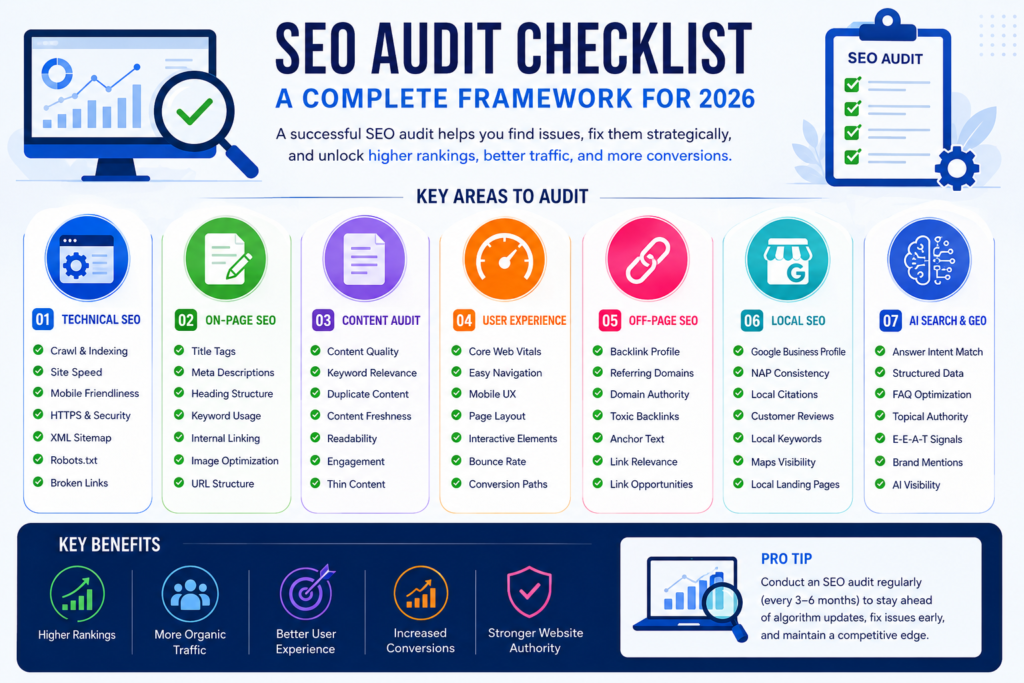
The Complete SEO Audit Checklist
1. Verify Website Indexing
The first step is confirming that search engines can discover and index your important pages.
Check for:
- Indexed pages
- No-index tags
- Blocked resources
- XML Sitemap
- Robots.txt configuration
- Canonical tags
If critical pages are not indexed, they cannot appear in search results regardless of content quality.
2. Review Website Structure
A well-organized website helps both users and search engines navigate content efficiently.
Your website should have:
- Logical navigation
- Clear category structure
- Descriptive URLs
- Breadcrumb navigation
- Consistent internal linking
Simple architecture improves crawlability and user experience.
3. Check URL Optimization
Every page should have:
✅ Short URLs
✅ Descriptive words
✅ Hyphens instead of underscores
✅ No unnecessary parameters
Example:
Good
yourdomain.com/seo-audit-checklist
Avoid
yourdomain.com/page?id=23874&cat=seo2026
4. Evaluate Page Titles
Each page requires a unique SEO title.
Best practices include:
- Primary keyword near the beginning
- 50–60 characters
- Natural wording
- Compelling for users
Example:
SEO Audit Checklist: Improve Your Website Rankings in 2026
5. Optimize Meta Descriptions
Meta descriptions influence click-through rates.
An effective description should:
- Summarize the page
- Include the focus keyword
- Stay under 160 characters
- Encourage users to visit the page
6. Review Heading Structure
Use headings logically.
- One H1
- Multiple H2 sections
- Supporting H3 headings
Avoid skipping heading levels or using headings purely for styling.
7. Improve Content Quality
High-quality content remains one of the strongest ranking factors.
Ask:
- Does this article answer user intent?
- Is the information accurate?
- Does it offer unique value?
- Is it easy to read?
- Is it updated?
Content should educate rather than simply target keywords.
8. Eliminate Duplicate Content
Duplicate pages confuse search engines and dilute authority.
Review:
- Duplicate titles
- Duplicate meta descriptions
- Similar blog articles
- Canonical issues
- Category duplication
Whenever possible, consolidate overlapping content into a stronger, more comprehensive page.
Coming in Part 2
We’ll cover:
- Technical SEO Audit
- Core Web Vitals
- Mobile SEO
- Internal Linking
- Image SEO
- Schema Markup
- Backlink Audit
- Local SEO
- AI Search (GEO & AEO) Checklist
- Advanced SEO Recommendations
Technical SEO Audit Checklist
Technical SEO forms the foundation of your website. Even outstanding content may struggle to rank if search engines encounter technical barriers while crawling or indexing your pages.
9. Measure Website Speed
Page speed affects both user experience and search rankings.
Review:
- Largest Contentful Paint (LCP)
- First Contentful Paint (FCP)
- Interaction to Next Paint (INP)
- Cumulative Layout Shift (CLS)
To improve speed:
- Compress images
- Enable browser caching
- Minify CSS and JavaScript
- Remove unused plugins
- Use a Content Delivery Network (CDN)
Fast websites reduce bounce rates and improve user satisfaction.
10. Test Mobile Friendliness
Most visitors now access websites through mobile devices.
Check:
- Responsive layouts
- Font readability
- Touch-friendly buttons
- Navigation menus
- Mobile loading speed
- Proper spacing between elements
A mobile-first experience is essential for both SEO and conversions.
11. Verify HTTPS Security
Security builds trust.
Ensure:
- SSL certificate is active
- No mixed-content warnings
- Every page loads over HTTPS
- HTTP automatically redirects to HTTPS
Secure websites are preferred by both users and search engines.
12. Find Broken Links
Broken links negatively affect user experience.
Audit:
- Internal links
- External links
- Images
- Downloadable files
- Redirect chains
Repair or replace broken links to maintain a healthy website.
13. Optimize Images
Large image files slow websites considerably.
Every image should include:
- Descriptive file name
- Alt text
- Proper dimensions
- Compression
- Modern formats such as WebP where appropriate
Example:
File Name
Alt Text
SEO Audit Checklist for Website Optimisation
14. Strengthen Internal Linking
Internal links help search engines discover related content.
Every important page should connect naturally with other relevant pages.
For example:
SEO Audit → Technical SEO
Technical SEO → Core Web Vitals
Core Web Vitals → Website Speed
Website Speed → User Experience
A strong internal linking structure improves crawlability and topical authority.
15. Audit External Links
Review outbound links regularly.
Ensure they:
- Point to trusted websites
- Remain active
- Support your content
- Open securely
Avoid linking to outdated or unreliable sources.
16. Implement Schema Markup
Schema provides additional context to search engines.
Recommended schema includes:
- Organization
- Article
- FAQ
- Breadcrumb
- Local Business
- Service
- Review
Structured data improves search visibility and helps AI systems better understand your content.
On-Page SEO Audit Checklist
17. Review Keyword Optimization
Instead of repeating keywords unnaturally, use them where they provide value.
Include your focus keyword in:
- SEO Title
- URL
- First paragraph
- One or two H2 headings
- Meta Description
- Image Alt Text
Write naturally and prioritize readability.
18. Improve Readability
Content should be easy to scan.
Use:
- Short paragraphs
- Bullet points
- Numbered lists
- Clear headings
- Simple language
Readers should quickly find the information they need.
19. Update Outdated Content
Older articles often lose rankings over time.
Update:
- Statistics
- Screenshots
- Examples
- Internal links
- Industry trends
Refreshing content signals that your website remains current and reliable.
20. Optimize Calls-to-Action
Every page should encourage visitors to take the next step.
Examples include:
- Request a consultation
- Contact our team
- Download a guide
- Explore our services
- Schedule a meeting
Clear CTAs improve conversions.
Local SEO Audit Checklist
If your business serves a specific location, Local SEO should be part of every audit.
Review:
- Google Business Profile
- Business Name, Address, and Phone Number consistency
- Customer reviews
- Local citations
- Local landing pages
- Google Maps optimization
Local visibility remains a significant source of qualified leads.
AI Search & GEO Checklist
Search is changing rapidly.
Modern SEO now includes preparing content for AI-powered search experiences.
Ask yourself:
- Does this page answer a specific question?
- Is the information original?
- Does it demonstrate expertise?
- Is the structure easy for AI to understand?
- Does it include FAQ content?
- Is schema implemented?
- Is the content updated regularly?
- Does the article provide genuine value?
Websites optimized for both traditional search and AI search will be better positioned for future visibility.
Common SEO Audit Mistakes
Avoid these frequent issues:
❌ Missing Meta Titles
❌ Duplicate Meta Descriptions
❌ Thin Content
❌ Keyword Stuffing
❌ Slow Website Speed
❌ Poor Mobile Experience
❌ Broken Internal Links
❌ Missing Alt Text
❌ Ignoring Core Web Vitals
❌ Never Updating Old Blogs
These problems can gradually reduce your search performance if left unresolved.
Conclusion
An SEO audit is not a one-time task—it is an ongoing process that helps your website stay competitive in an ever-changing digital landscape. Search engines continue to evolve, user expectations are increasing, and AI-powered search experiences are reshaping how information is discovered.
A well-executed SEO audit goes beyond fixing technical issues. It ensures your content is valuable, your website delivers a seamless user experience, and your business is positioned to earn trust from both search engines and AI-driven platforms.
Businesses that regularly review their websites, update content, improve technical performance, and focus on user intent are more likely to achieve sustainable organic growth. Rather than chasing quick wins, invest in building a website that consistently delivers value.
By following this SEO Audit Checklist, you’ll not only improve your rankings in traditional search engines but also prepare your website for the future of AI-powered search.
Frequently Asked Questions (FAQs)
1. What is an SEO audit?
An SEO audit is a complete evaluation of your website’s performance, technical health, content quality, user experience, and search visibility. It helps identify issues that may be preventing your website from ranking well in search engines.
2. How often should I perform an SEO audit?
A comprehensive SEO audit should be conducted every 3 to 6 months. High-traffic or frequently updated websites may benefit from monthly reviews to ensure optimal performance.
3. Which tools are best for conducting an SEO audit?
Some of the most effective SEO audit tools include:
- Google Search Console
- Google Analytics 4
- Google PageSpeed Insights
- Google Lighthouse
- SEMrush
- Ahrefs
- Screaming Frog SEO Spider
- Rank Math SEO
- GTmetrix
Using a combination of these tools provides a more complete understanding of your website’s SEO health.
4. Why is technical SEO important?
Technical SEO ensures that search engines can crawl, index, and understand your website efficiently. It also improves user experience through faster loading speeds, mobile optimization, and secure browsing.
5. What are Core Web Vitals?
Core Web Vitals are performance metrics that evaluate loading speed, responsiveness, and visual stability. These factors contribute to both user satisfaction and search performance.
6. Can an SEO audit improve website traffic?
Yes. By identifying and resolving technical issues, improving content quality, optimizing metadata, and strengthening internal linking, an SEO audit can significantly improve organic traffic over time.
7. Is local SEO included in an SEO audit?
Yes. For businesses serving specific locations, an SEO audit should include Google Business Profile optimization, local citations, review management, and location-specific landing pages.
8. Does an SEO audit help AI search visibility?
Absolutely. Modern SEO audits should evaluate whether your website is prepared for AI-powered search experiences by reviewing content quality, topical authority, structured data, and overall trustworthiness.
9. What is the biggest SEO mistake businesses make?
One of the most common mistakes is neglecting regular website maintenance. Outdated content, broken links, duplicate pages, and slow loading speeds can gradually reduce search visibility.
10. Can I perform an SEO audit myself?
Basic SEO audits can be performed using free tools such as Google Search Console and Google PageSpeed Insights. However, a professional audit provides deeper technical analysis and strategic recommendations that can deliver stronger long-term results.
