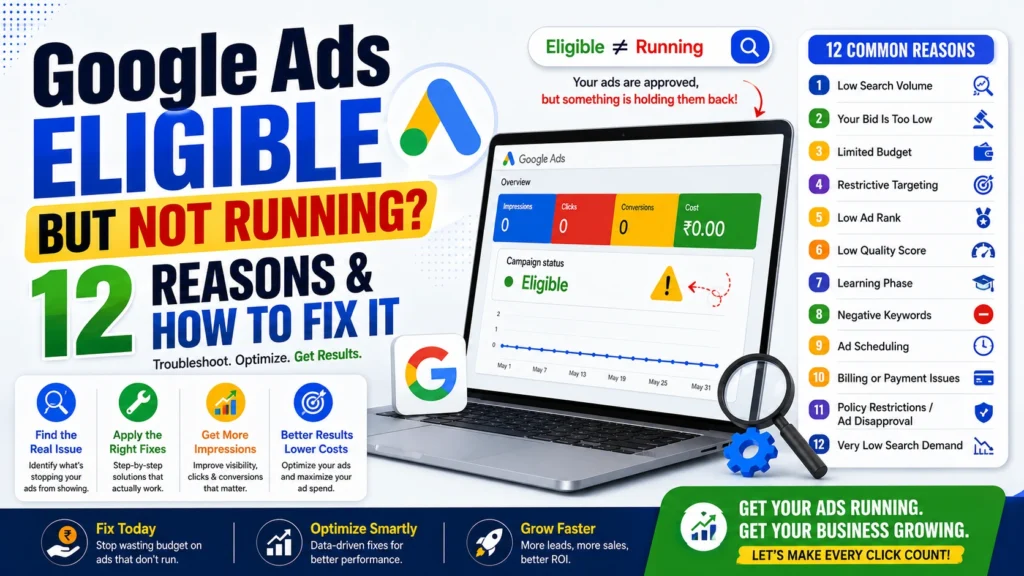
Google Ads Eligible But Not Running? 12 Reasons & How to Fix It
Introduction
You launch your Google Ads campaign, review the settings, and everything appears to be in order. The campaign status says “Eligible,” yet impressions remain at zero and your budget isn’t being spent.
If you’ve encountered this issue, you’re not alone.
An Eligible status simply means your ads are approved and capable of serving. It doesn’t guarantee that they’ll enter auctions or receive impressions. Several factors—such as low search volume, restrictive targeting, bidding strategy, budget limitations, or Ad Rank—can prevent your ads from running consistently.
In this guide, we’ll explain the 12 most common reasons why Google Ads show “Eligible” but aren’t running and share practical solutions to help your campaigns start generating impressions, clicks, and conversions.
What Does “Eligible” Mean in Google Ads?
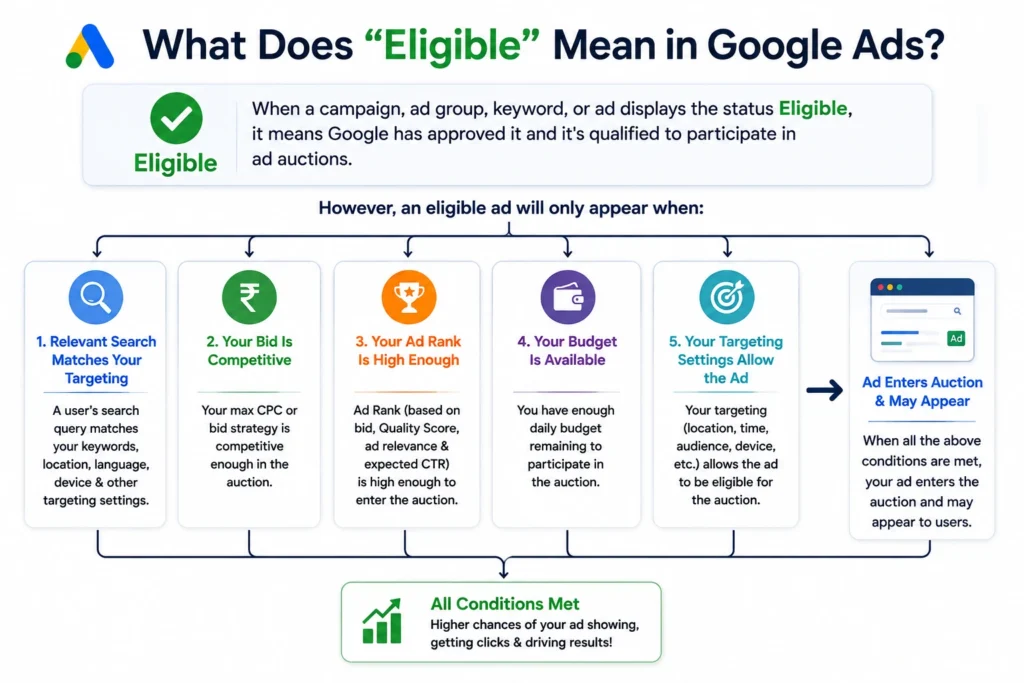
When a campaign, ad group, keyword, or ad displays the status Eligible, it means Google has approved it and it’s qualified to participate in ad auctions.
However, an eligible ad will only appear when:
- A relevant search matches your targeting.
- Your bid is competitive.
- Your Ad Rank is high enough.
- Your budget is available.
- Your targeting settings allow the ad to enter the auction.
If one or more of these conditions aren’t met, your campaign may remain eligible without receiving impressions.
1. Low Search Volume
One of the most common reasons for an eligible campaign receiving no impressions is targeting keywords with very low search demand.
How to Fix It
- Use Google Keyword Planner to evaluate search volume.
- Add broader but still relevant keywords.
- Include phrase match and broad match where appropriate.
- Remove keywords with consistently low search activity.
2. Your Bid Is Too Low
Google Ads is auction-based. If your maximum CPC bid is significantly lower than competitors, your ads may rarely or never appear.
How to Fix It
- Increase your bid.
- Test automated bidding strategies such as Maximize Clicks or Maximize Conversions.
- Monitor Auction Insights to understand your competitiveness.
3. Limited Budget
A small daily budget can restrict participation in auctions, especially in competitive industries.
How to Fix It
- Increase your daily budget.
- Focus on high-performing campaigns.
- Pause low-priority campaigns if necessary.
4. Restrictive Targeting
Very narrow targeting can dramatically reduce your audience size.
Common Examples
- Tiny geographic radius
- Multiple audience restrictions
- Narrow scheduling
- Specific device targeting only
How to Fix It
Review and broaden targeting where appropriate while maintaining relevance
5. Low Ad Rank
Ad Rank determines whether your ad appears in search results. It depends on:
- Bid amount
- Quality Score
- Expected CTR
- Ad relevance
- Landing page experience
6. Low Quality Score
Your Quality Score plays a major role in determining whether your ads are competitive in the auction. Even if your campaign is eligible, a low Quality Score can reduce impressions and increase your cost per click.
Quality Score is influenced by:
- Expected Click-Through Rate (CTR)
- Ad Relevance
- Landing Page Experience
How to Fix It
- Use keywords naturally in your headlines and descriptions.
- Write compelling ad copy that matches user intent.
- Improve your landing page speed and mobile experience.
- Ensure your landing page content aligns with the ad.
A higher Quality Score can improve your Ad Rank without necessarily increasing your bids.
7. Campaign Is Still in the Learning Phase
If you’ve recently launched a campaign or made significant changes, Google Ads may need time to optimize performance.
During the learning phase, impressions may fluctuate while the system gathers data.
How to Fix It
- Allow the campaign to run for several days without major edits.
- Avoid changing budgets or bidding strategies too frequently.
- Monitor performance before making optimization decisions.
Patience during the learning phase often leads to more stable results.
8. Negative Keywords Are Blocking Traffic
Negative keywords help prevent irrelevant searches, but using them incorrectly can stop your ads from appearing for valuable searches.
Common Mistakes
- Adding broad negative keywords without reviewing search intent.
- Accidentally blocking your primary keywords.
- Applying negative keyword lists to multiple campaigns without checking relevance.
How to Fix It
- Review your negative keyword lists regularly.
- Remove unnecessary negative keywords.
- Use the Search Terms Report to identify blocked opportunities.
9. Ad Scheduling Is Too Restrictive
Your ads only appear during the times you’ve selected.
If your schedule is too limited, you may miss valuable searches throughout the day.
How to Fix It
- Review your ad schedule settings.
- Run ads throughout the day initially.
- Use performance data to optimize scheduling later.
10. Billing or Payment Issues
Google Ads won’t serve ads if there are payment problems.
Common issues include:
- Expired payment method
- Failed transactions
- Outstanding balance
- Account suspension due to billing
How to Fix It
- Verify your payment method.
- Clear any outstanding balance.
- Check your Billing section for alerts.
- Update expired card details.
11. Policy Restrictions or Ad Disapproval
Even if your campaign appears eligible, certain assets or policy limitations may prevent ads from serving effectively.
How to Fix It
- Review the Policy Manager in Google Ads.
- Resolve any disapproved ads or assets.
- Follow Google’s advertising policies.
- Submit the ad for review after making corrections.
12. Your Campaign Has Very Low Search Demand
Sometimes the issue isn’t the campaign—it’s the market.
If very few people are searching for your products or services, impressions will naturally be limited.
How to Fix It
- Expand keyword targeting.
- Add related search terms.
- Test broader match types where appropriate.
- Consider running Performance Max or Display Campaigns for additional reach.
Quick Troubleshooting Checklist
If your Google Ads are eligible but not running, review the following:
- ✅ Campaign is enabled
- ✅ Ads are approved
- ✅ Budget is sufficient
- ✅ Bids are competitive
- ✅ Keywords have search volume
- ✅ Targeting isn’t overly restrictive
- ✅ No conflicting negative keywords
- ✅ Billing is active
- ✅ Ad schedule allows serving
- ✅ Landing pages are working properly
- ✅ Quality Score is improving
- ✅ Campaign has completed the learning phase
Optimize for AI Search (AEO)
Many advertisers now ask AI platforms questions like:
- Why are my Google Ads eligible but not running?
- How do I fix Google Ads with no impressions?
- Why isn’t my Google Ads campaign spending money?
To improve visibility in AI-powered search:
- Answer questions directly.
- Use descriptive headings.
- Include concise FAQs.
- Add structured data (FAQ Schema and Article Schema).
- Keep explanations practical and easy to understand.
Well-structured content has a greater chance of appearing in Google AI Overviews and other AI-powered search experiences.
Frequently Asked Questions (FAQs)
Why are my Google Ads eligible but not running?
An Eligible status means your ads are approved to participate in auctions, but factors like low search volume, low bids, restrictive targeting, poor Ad Rank, or budget limitations may prevent them from receiving impressions.
How long does it take for Google Ads to start running?
Most Google Ads campaigns begin serving within a few hours after approval. However, new campaigns or campaigns using automated bidding may require additional time during the learning phase.
Why are my Google Ads not getting impressions?
Common reasons include low search volume, limited budget, restrictive targeting, low Quality Score, weak Ad Rank, negative keywords, or billing issues.
Does increasing my budget help Google Ads run?
A higher budget can improve your campaign’s ability to participate in more auctions. However, campaign performance also depends on bidding strategy, ad quality, targeting, and keyword demand.
Can negative keywords stop my ads from showing?
Yes. Incorrectly configured negative keywords can block your ads from appearing for relevant searches. Review your negative keyword list regularly to avoid restricting valuable traffic.
How do I know if my Google Ads campaign has a problem?
Use the Campaign Diagnostics and Policy Manager tools in Google Ads to identify issues related to ad approval, targeting, bidding, billing, or campaign settings.
Google Ads Optimization Checklist
Before making major changes, review this checklist:
- ✅ Campaign and ad groups are enabled
- ✅ Ads are approved
- ✅ Keywords have sufficient search volume
- ✅ Bids are competitive
- ✅ Daily budget is adequate
- ✅ Location targeting is appropriate
- ✅ Audience targeting isn’t too restrictive
- ✅ Negative keywords are reviewed
- ✅ Ad schedule allows enough coverage
- ✅ Landing pages load quickly and work properly
- ✅ Billing information is up to date
- ✅ Campaign has completed the learning phase
- ✅ Conversion tracking is configured correctly
- ✅ Quality Score is monitored and improved regularly
Final Thoughts
Seeing an “Eligible” status without impressions can be frustrating, but it doesn’t always indicate a technical issue. In many cases, the problem lies in campaign settings, keyword selection, bidding strategy, targeting, or competition.
By reviewing the factors covered in this guide, you can identify what’s limiting your campaign and make informed optimizations that improve visibility, increase impressions, and drive better results.
Remember that Google Ads is an ongoing optimization process. Regular monitoring, testing, and data-driven adjustments are essential to achieving consistent performance and maximizing your advertising budget.
Maximize Your Google Ads Performance with Rebootiq
At Rebootiq, we help businesses create, manage, and optimize Google Ads campaigns that deliver measurable results.
Our Google Ads services include:
- Search Ads Management
- Performance Max Campaigns
- Display & Remarketing Campaigns
- Keyword Research & Planning
- Conversion Tracking Setup
- Landing Page Optimization
- Bid Strategy Optimization
- Campaign Audits
- Performance Reporting
Whether you’re launching your first campaign or trying to improve an existing one, our team develops customized PPC strategies to help you generate qualified leads, increase conversions, and maximize your return on investment.
Ready to get your Google Ads performing better?
Visit https://rebootiq.com/ and discover how our PPC experts can help your business grow.
