How to Increase Page Relevance in Google Ads: A Complete Guide
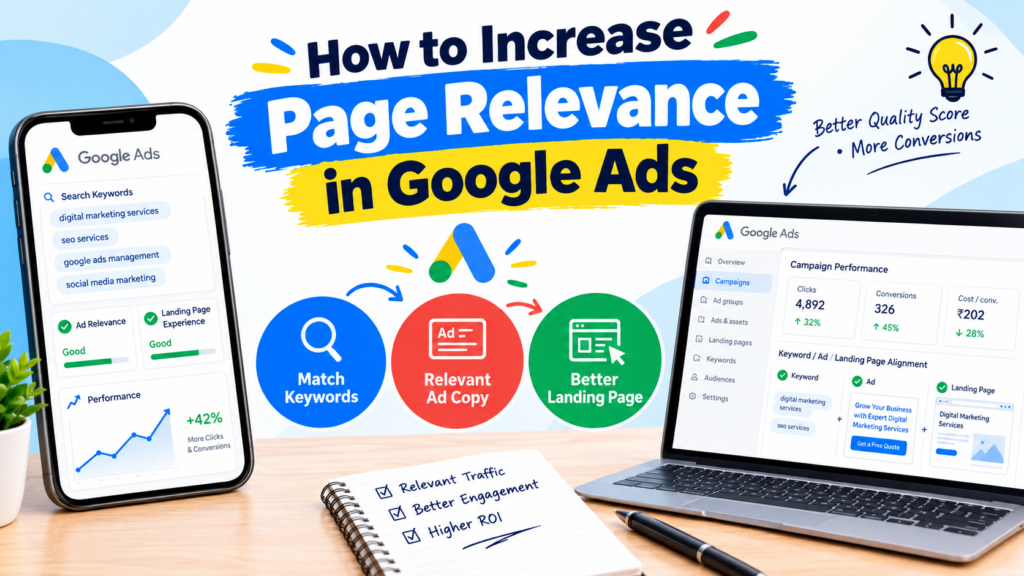
Page relevance is an important factor in Google Ads that helps advertisers understand how closely their ads and landing pages match a user’s search intent. When your landing page provides relevant information that matches your ad and targeted keywords, you can create a better user experience and improve campaign performance.
In this blog, we will explore how to increase page relevance in Google Ads using practical strategies that can help improve ad quality, user experience, and conversion potential.
What Is Page Relevance in Google Ads?
Page relevance refers to how closely the content of your landing page matches the keywords, ad copy, and search intent of your target audience.
For example, if you run a Google Ads campaign targeting the keyword “digital marketing services in Bangalore,” your landing page should provide information about your digital marketing services, pricing, benefits, and contact options.
Sending users to a generic homepage with unrelated information may create a disconnect between their search and your offer.
It is important to understand that landing page relevance is one component of the landing page experience assessment, which contributes to the overall Quality Score alongside expected click-through rate and ad relevance.
1. Match Your Landing Page Content With Target Keywords
One of the most effective ways to improve page relevance is to align your landing page content with the keywords you target.
Identify the main keywords in your ad group and naturally include them in relevant sections of your landing page, such as:
- Page title and main heading
- Introduction and service descriptions
- Relevant subheadings
- Image alt text, where appropriate
- Meta title and description, where useful for organic search
Avoid keyword stuffing. Your content should read naturally and answer the questions users are likely to have.
2. Create Dedicated Landing Pages for Different Ad Groups
Avoid sending every Google Ads visitor to the same landing page, especially when your campaigns promote different products or services.
For example, a digital marketing agency could create separate landing pages for Google Ads management, SEO services, and social media advertising.
Each page should focus on the specific service promoted in its corresponding ad group. This approach helps users find relevant information quickly and creates a consistent experience from search to conversion.
3. Align Your Ad Copy With Your Landing Page
Your ad copy should communicate an offer or benefit that visitors can find on your landing page.
If your ad promises “Affordable Google Ads Management,” the landing page should explain your service, pricing approach, benefits, and next steps.
Maintain consistency across the following elements:
- Target keyword and search intent
- Ad headline and description
- Landing page headline
- Service details and offer
- Call to action
This consistency helps reduce confusion and builds trust with potential customers.
4. Improve Landing Page User Experience
Relevant content alone is not enough. Visitors should be able to navigate your landing page easily and take the desired action without unnecessary effort.
To improve the landing page experience:
- Make sure the page loads quickly, particularly on mobile devices.
- Use a responsive design for different screen sizes.
- Keep navigation simple and intuitive.
- Place important information above the fold where practical.
- Use clear calls to action, such as “Get a Free Quote” or “Book a Consultation.”
- Ensure forms are short and easy to complete.
- Provide genuine business contact information and relevant trust signals.
A smooth user experience can support conversion performance and improve users’ overall experience with your ads.
5. Use Negative Keywords to Improve Traffic Relevance
Negative keywords help prevent your ads from appearing for searches that are unrelated to your business or offer.
For example, if you provide paid digital marketing services, adding suitable negative keywords such as “free course” or “jobs” may help reduce irrelevant clicks.
Review your search terms report regularly to identify unwanted queries. Add negative keywords carefully to avoid excluding searches that could generate valuable leads.
6. Monitor Quality Score and Landing Page Experience
Google Ads provides diagnostic information that can help you identify opportunities for improvement.
Review the Quality Score components available in your account, including landing page experience, ad relevance, and expected click-through rate.
If landing page experience is rated below average, review your content relevance, page usability, transparency, and mobile performance.
Test different headlines, page layouts, and calls to action to understand which changes improve engagement and conversions. Remember that Quality Score is a diagnostic tool, not a direct measure of campaign profitability.
Conclusion
Understanding how to increase page relevance in Google Ads can help you build more consistent campaigns and deliver a better experience to potential customers.
Focus on matching keywords with landing page content, creating dedicated pages, aligning ad copy with your offer, improving usability, and filtering irrelevant traffic. Regularly review your campaign data and make improvements based on actual user behaviour.
The key is simple: give users exactly what your ad promises and make it easy for them to take the next step.
