
Title Tag vs. H1: What’s the Difference and Why Does It Matter for SEO?
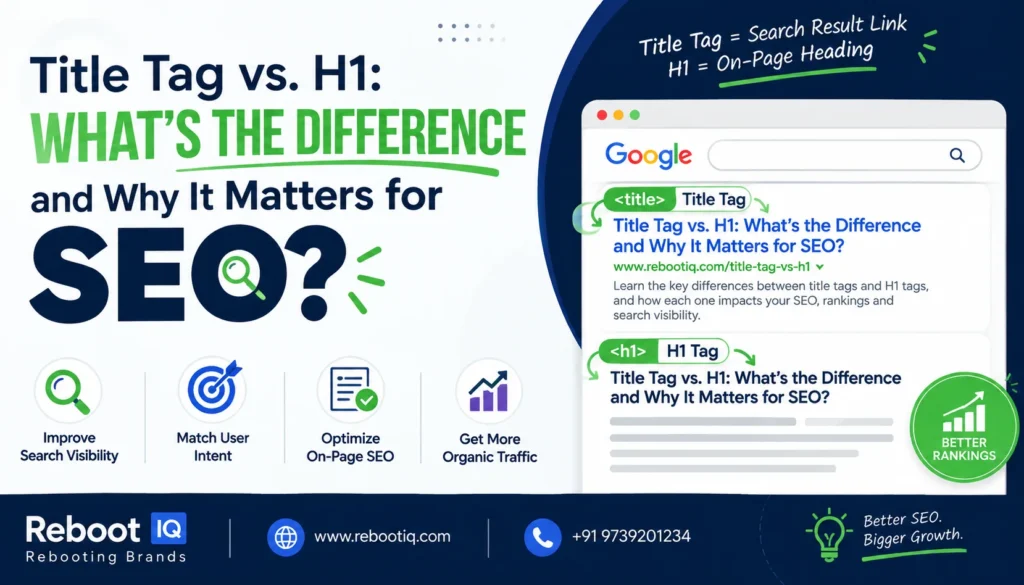
When discussing on-page SEO, two elements are often mentioned together: the Title Tag and the H1 Tag. Many website owners assume they are the same thing, but they serve different purposes in both search engine optimization and user experience.
Understanding the difference between title tags and H1 headings can help improve search visibility, increase click-through rates (CTR), and create a better experience for website visitors.
In this guide, we’ll explain what title tags and H1 tags are, how they differ, and why both are important for SEO success.
What Is a Title Tag?
A title tag is an HTML element placed inside the <head> section of a webpage. It acts as the page title shown in browser tabs and is often used by Google as the clickable headline in search results. Google considers the title tag one of several sources for generating search result titles.
Example:
<title>Digital Marketing Services in India | RebootIQ</title>
Users typically see the title tag:
- In Google search results
- In browser tabs
- In bookmarks
- On social media previews
Because it is often the first thing users see in search results, the title tag plays a major role in attracting clicks.
What Is an H1 Tag?
The H1 tag is the primary heading displayed on the webpage itself. It tells visitors what the page is about after they arrive on the site.
Example:
<h1>Professional Digital Marketing Services for Business Growth</h1>
Unlike the title tag, the H1 appears within the page content and serves as the main heading for readers. It helps organize content and provides context about the page topic.
Title Tag vs. H1: Key Differences
Although both describe the page, they have different purposes.
| Title Tag | H1 Tag |
| Appears in search results and browser tabs | Appears on the webpage itself |
| Located in the HTML head section | Located in the page body |
| Primarily influences search result clicks | Primarily helps users understand page content |
| Often acts as a SERP headline | Acts as the page headline |
| Designed for searchers before they visit | Designed for visitors after they arrive |
A simple way to think about it:
Title Tag = Search Result Headline
H1 Tag = On-Page Headline
Both work together to communicate the page topic to users and search engines.
Should Your Title Tag and H1 Be Identical?
Many SEO beginners believe the title tag and H1 must match exactly.
In reality, they do not have to be identical. Google has stated that you should use wording that makes sense for users rather than forcing both elements to be the same.
For example:
Title Tag:
Digital Marketing Services in India | RebootIQ
H1 Tag:
Grow Your Business with Expert Digital Marketing Services
Both headings communicate the same topic while serving different purposes.
The title tag focuses on attracting clicks from search results, while the H1 focuses on engaging users once they land on the page.
Why Title Tags Matter for SEO
Title tags are one of the most visible SEO elements.
A well-written title tag can:
- Improve click-through rates
- Communicate page relevance
- Help users understand page content
- Encourage more organic traffic
Google recommends creating unique, descriptive, and concise title tags that accurately represent the page content. Poor or misleading titles may be rewritten by Google in search results.
Why H1 Tags Matter for SEO
H1 tags help structure your content and improve readability.
Benefits include:
- Better user experience
- Clear page organization
- Improved content hierarchy
- Easier navigation for visitors
H1 tags also help search engines understand the primary topic of a page, especially when combined with supporting H2 and H3 headings.
Best Practices for Title Tags and H1s
1. Keep Both Relevant
Your title tag and H1 should describe the same topic, even if the wording differs.
2. Include Important Keywords Naturally
Place your primary keyword where it fits naturally. Avoid keyword stuffing.
3. Use Only One Main H1
A clear primary heading makes content easier to understand.
4. Write for Humans First
Focus on clarity and usefulness rather than trying to force SEO formulas.
5. Make Titles Unique
Every page should have its own unique title tag and H1 that accurately reflects its content.
How RebootIQ Helps Businesses Improve SEO
Optimizing title tags and H1 headings is just one part of a successful SEO strategy. Businesses also need keyword research, technical SEO, content optimization, internal linking, and conversion-focused website improvements.
At RebootIQ, we help businesses improve their online visibility through SEO, Google Ads, Meta Ads, website development, and performance-driven digital marketing solutions.
Whether you’re trying to increase rankings, generate more leads, or improve website traffic, a strong on-page SEO strategy starts with properly optimized page structure and content.
You can also explore our SEO resources and digital marketing insights on the RebootIQ blog to learn more about improving your website’s search performance.
Final Thoughts
Title tags and H1 tags may seem similar, but they serve different roles in SEO.
The title tag helps attract clicks from search results, while the H1 helps visitors understand the content once they arrive on your page. Together, they create a stronger user experience and help search engines better understand your content.
When used correctly, both elements contribute to improved visibility, better engagement, and stronger SEO performance. Instead of focusing on whether they match exactly, focus on making both clear, relevant, and valuable to users.
